API keys
Publishable keys for your apps, secret keys for your servers, and how to manage both.
An API key identifies your project to Voidhash. Apps and websites use a publishable key, which is safe to ship. Servers, CI and scheduled jobs use a secret key, which never leaves your infrastructure. Find and manage both under Settings → API keys.
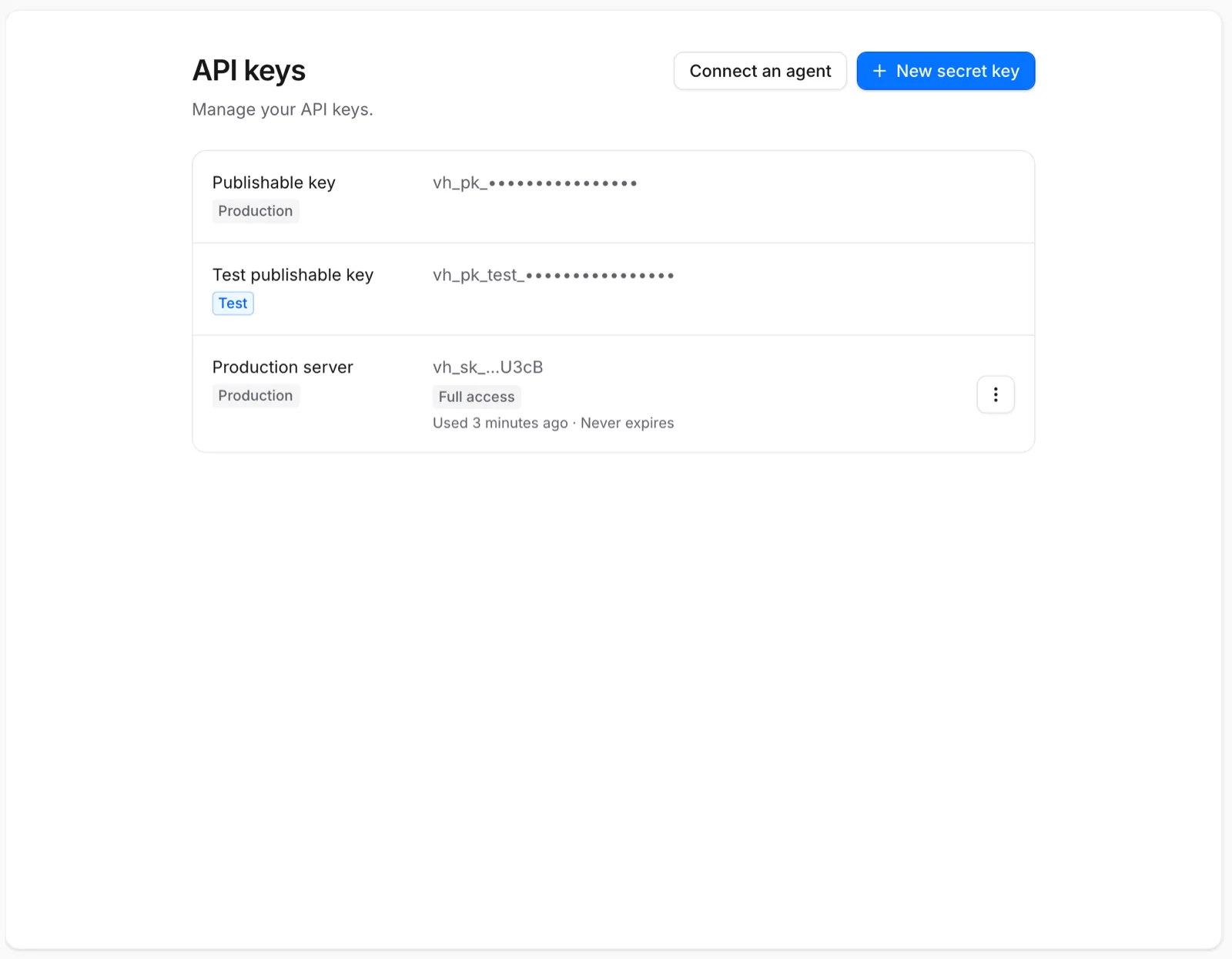
Every key belongs to the production or test environment for its whole life, and that environment decides which purchases it reads.
| Key | Production | Test | Where it goes |
|---|---|---|---|
| Publishable | vh_pk_… | vh_pk_test_… | Mobile apps, websites, any distributed client |
| Secret | vh_sk_… | vh_sk_test_… | Your backend, CI, scheduled jobs |
Publishable keys
Every project has two publishable keys, one production and one test. Click a key in the list to copy it. Publishable keys can't be created, rolled or deleted.
A publishable key only works with the endpoints the SDKs use, and always on behalf of one person, named by their distinct ID. With it, an app can read that person's access, identify them, report their store purchases, evaluate feature flags, load paywalls and send events. It can't read other people, revenue or configuration, and it can't change settings.
Release builds, including TestFlight and Play test tracks, use the production publishable key. Debug builds in development mode and staging websites use the test key.
Secret keys
A secret key lets your server act on one project through the HTTP API, the server libraries, the CLI or the MCP server. Voidhash stores only a hash of it, so the full value is shown once, when you create or roll the key.
A secret key belongs to one project and one environment, so give each deployment its own: a test
key on staging, a production key in production. The server libraries look up the key's project with
GET /api/v1/session on the first call that needs it,
unless you pass the project ID.
Never put a secret key in a mobile app, a web bundle, a repository or an event property. If one is exposed, roll it with Stop it now.
Create a secret key
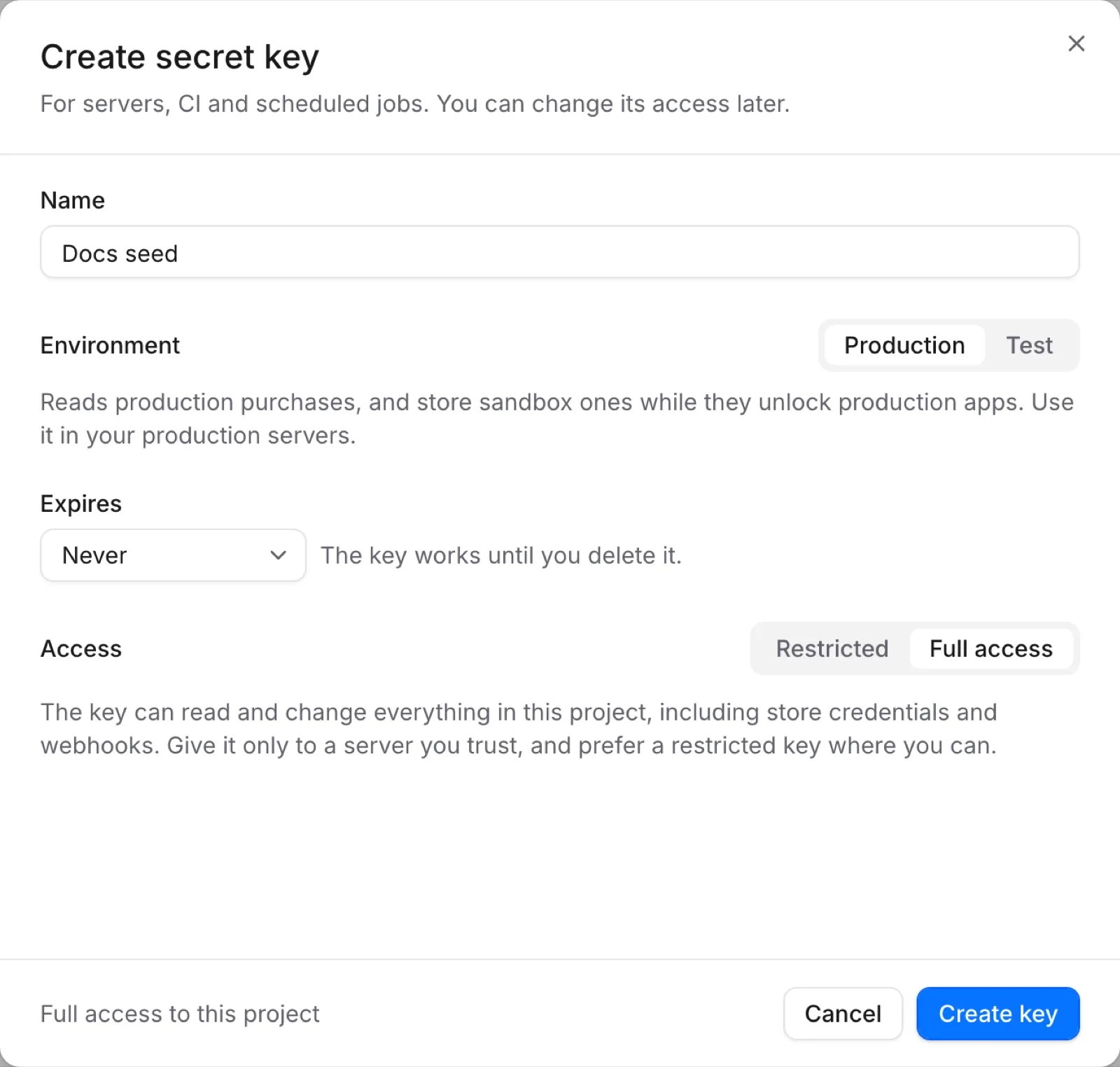
Name it and choose its environment
Enter a Name of 3 to 32 characters, such as Production backend. Choose Production or
Test under Environment. You can't change the environment later.
Choose when it expires
Under Expires, choose Never, 30 days, 90 days, 365 days or Custom date. A
key with a custom date works through the end of that day. After it expires, every request with the
key is answered with 401, and the list marks it Expired.
Choose its access
Leave Access on Restricted and pick None, Read or Write for each part of the project the key needs. Write includes Read. To start faster, choose a template under Start from a template and adjust it. Choose Full access only for a server you trust.
Copy the key
Choose Create key, then copy the value from Your new secret key into your secret manager or an environment variable. You won't see it again.
Access levels
A restricted key gets a level per resource. Every key can also read its own project.
| Group | Resources | Extra permission, granted separately |
|---|---|---|
| Customers & access | Customers, Entitlements, Purchases (Write only), Test purchases | Erase customers and their data |
| Monetization | Products, Paywalls, Experiments, Feature flags | Publish paywalls to your app |
| Insights | Analytics, Ads, Events, Notifications | Send notifications |
| Automations | Automations | Activate automations |
| Collaboration | Files | — |
| Settings | Webhooks, Store credentials, Project settings (Write only), Audit log (Read only) | — |
The templates:
| Template | Grants |
|---|---|
| Backend integration | Write Customers, Entitlements, Purchases and Events; read Products. |
| Read-only analytics | Read Analytics and Ads. |
| Read-only | Read everything except Store credentials. |
| Paywall publishing | Write Paywalls with Publish paywalls to your app; read Products. |
Full access reads and changes everything a key can reach, including store credentials and
webhooks. A request that needs a permission the key lacks is answered with 403.
Manage a secret key
Each secret key in the list shows its environment, its first and last characters, its access, when it was last used (to within a minute, or Never used) and when it expires. Use Never used and old dates to find keys nothing depends on.
Open Key actions (the menu at the end of the row) to:
- Edit access: change the key's access, with the same choices as when you created it. The secret stays the same, and the change applies at once.
- Roll key: issue a new secret and keep the key's name, environment, access and expiry. Under Old secret keeps working, choose Stop it now, 1 hour, 24 hours or 7 days. During the overlap both secrets work, so you can deploy the new one without downtime. Rolling again ends an earlier overlap at once.
- Delete key: delete it permanently. Services still using it stop working.
Through the API, POST /api/v1/projects/{projectId}/api-keys/{apiKeyId}/rotate rolls a key, with
the overlap in overlapSeconds.
Who can manage keys
Admins and owners can see and manage API keys; see Members and roles. You can only give a key permissions your own role holds, so Studio offers only those.
Creating, editing, rolling and deleting keys needs you signed in to Studio as yourself. The CLI
(voidhash key list), AI agents and full-access secret keys can list keys but never change them, so
no key or agent can widen its own access or outlive its removal.
Sign-in tokens and agents
The CLI and AI agents don't need a secret key on your machine. voidhash login signs the CLI in as
you, and Connect an agent on the API keys page sets up an AI agent to sign in to the MCP server
the same way. Both act with your role in every project you can use, and appear under Settings →
Personal settings → Devices and apps, where you can make them read-only or disconnect them. A
sign-in stops working after 90 days without use. Use a secret key for CI and other unattended jobs.
See Authentication and MCP server.
Next steps
- Authenticate API requests
- Check access from your backend with Node.js, PHP, Go, Rust or over HTTP
- Webhook delivery
Something wrong or missing on this page? Tell us by email or on Discord.