Paywalls in your app
How a paywall designed in Studio reaches your app, and what your app does to show it.
A paywall is a screen, or a series of screens, that your team designs in Studio and your app presents natively through the SDK. Your app asks for a location, never for a specific paywall, so the paywall it shows can change without an app release.
Paywalls are in early access. Ask us on Discord, or email support@voidhash.com on a paid plan, to turn them on for your team.
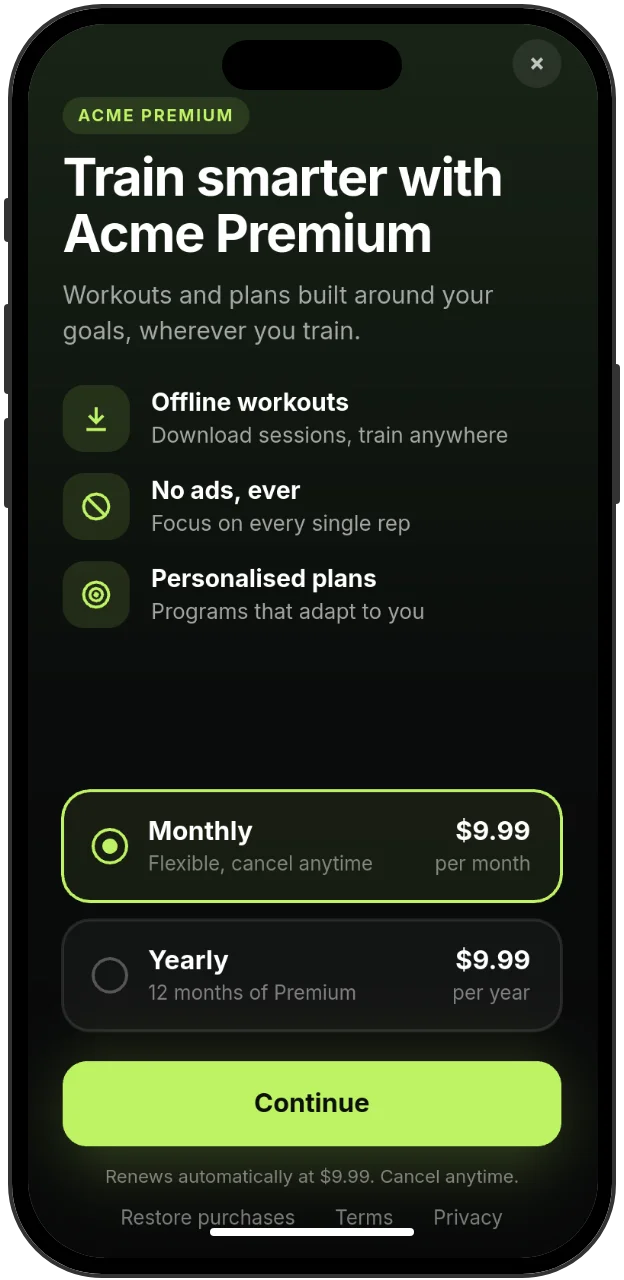
Studio's preview shows every price as $9.99. In your app, each plan shows its store price.
How a paywall reaches your app
- Your team designs a paywall in Studio, builds it and deploys the build. Designing never changes what apps show; only a deploy does.
- The paywall is placed at a location, a stable slug such as
onboardingthat names a place in your app. A location shows one paywall at a time, or runs an A/B test that picks a paywall per person. - Your app calls
presentFlowwith the location slug. The SDK argument is namedplacement, but it takes the location slug. See Swift, Kotlin and React Native. - The SDK asks Voidhash what the location shows, downloads that build, verifies it, draws it natively and returns how the flow ended.
Paywalls and onboarding flows, multi-screen flows that continue after a purchase, are presented the same way. The SDKs call both flows. Your app code is the same whichever paywall or test the location shows. Designing, deploying and placing paywalls happen in Studio; see Design a paywall and Paywall locations.
Platform support
| Platform | Paywalls |
|---|---|
| iOS | Drawn natively by the Swift SDK's paywall renderer, which you add to your app. |
| Android | Drawn natively by the Kotlin SDK's paywall renderer, which you add to your app. |
| React Native | Drawn natively on iOS and Android through the same renderers, turned on in the config plugin. |
| Web | Not supported. The web SDK doesn't present paywalls; build your own pricing page. |
Purchases on a paywall go through the SDK like any other purchase, through the App Store on iOS and Google Play on Android. Prices always come from the store.
What your app does
Add the renderer
The paywall renderer is a native library that you build from source and pass to the SDK when you
configure it. Without it, presentFlow fails with FLOW_RENDERER_MISSING and the SDK makes no
paywall requests. See Swift,
Kotlin or
React Native.
Present a location and handle the result
presentFlow returns when the flow ends:
| Result | Meaning |
|---|---|
purchased | A purchase on a paywall completed and the paywall closed. Includes the product ID. |
restored | A restore on a paywall completed and the paywall closed. |
finished | The flow ran a Finish flow action. Includes the action's result name and the flow's variables. |
closed | The person closed it, your app called dismissFlow(), or another flow replaced it. |
failed | Nothing was shown. The error code says why, such as FLOW_NOT_ASSIGNED for a location with no paywall. |
An onboarding flow never returns purchased or restored; it continues to its next screen. Check
the person's perks after any result rather than relying on it. A
cancelled or failed purchase leaves the paywall on screen so the person can try again.
FLOW_NOT_ASSIGNED is the normal answer for a location nobody has set up, and older app versions
get it when the deployed build needs a newer SDK. Show your own upgrade screen on failed at every
entry point that must always sell.
Grant capabilities
Purchases, restores, closing, navigation and analytics always work. Actions that reach outside the
paywall are off until your app grants them with flowCapabilities; only links are granted by
default.
| Capability | Lets a paywall |
|---|---|
| Links | Open URLs outside the app (Open URL). |
| Notifications | Ask for notification permission. |
| Tracking | Ask for App Tracking Transparency permission. On Android the answer is false. |
| Attributes | Save values as person attributes. |
An action you didn't grant is skipped with a warning. Notification and tracking prompts also need the platform declarations listed on each SDK page.
Caching and offline
The iOS and Android SDKs, and React Native through them, cache what each location shows:
- An answer is fresh for 1 hour. Within that hour,
presentFlowshows the cached paywall without asking Voidhash. - After an hour, presenting asks Voidhash again and waits up to 500 ms for the reply; without one, it shows the cached paywall while the request finishes. The SDK also refreshes stale locations at launch and when the app returns to the foreground.
- Answers are kept for 7 days, and downloaded builds stay on the device, so a location shown once works offline. Empty answers are cached too.
- A paywall already on screen keeps its build until it is presented again.
So a deploy, a new placement or an ended placement reaches most devices within about an hour. The SDK
remembers the last 20 locations it presented and downloads them at launch. List others in
preloadPlacements to have them ready on first launch. On a device that has never shown a location
and can't reach Voidhash, presentFlow fails with FLOW_UNAVAILABLE.
Older app versions
Each SDK tells Voidhash which paywall engine it runs, and Voidhash sends a build only to apps that
can draw it. An app whose SDK is too old for the live build gets FLOW_NOT_ASSIGNED, the same answer
as an empty location, so it shows your fallback instead of a broken paywall. There is no
minimum-version setting: each build decides by what it uses, and updating the SDK in your app makes
the paywall reach it. For custom components, see
Older app versions.
Onboarding flows also save their variables on the device for each person, so answers survive a relaunch; see your SDK page.
Analytics
Each screen a flow shows is recorded as a $screen event, and events the flow tracks carry
paywall_location and paywall_id properties. A purchase made on a paywall is credited, with its
renewals, to the location, paywall and A/B test arm. Restores and purchases made outside a paywall
aren't. See Events.
Next steps
- Present a paywall from Swift, Kotlin or React Native.
- Feature flags and A/B tests: test paywalls without app code.
- Design a paywall in the Help center.
- Custom components: build paywall pieces with their own behavior.
Something wrong or missing on this page? Tell us by email or on Discord.