Send purchases to Meta
Report purchases to Meta's Conversions API from Voidhash, for people who agreed to it.
Voidhash can send your production purchases to Meta's Conversions API, so Meta counts purchases its pixel and app tracking miss, such as renewals and purchases on another device, and optimizes your campaigns for people who buy. Sending is off until you turn it on, and it uses its own token, separate from the ad account's.
What Meta receives
For each production purchase of a person who agreed to it, Voidhash sends a Purchase event with its time, amount and currency, plus what Meta needs to recognize the person: their email and user ID in hashed form, and the Meta click details from the ad that brought them in.
Voidhash doesn't send:
- purchases of people Meta can't recognize: no email and no Meta click details;
- free trials, refunded purchases, and purchases of people whose data is being deleted;
- purchases from the sandbox or test environments.
Meta counts each purchase once, even if it arrives twice. If your website or app also sends purchases to Meta, they count twice; send them one way only.
Ask for agreement
Agreeing to analytics doesn't cover sharing purchases with ad platforms. Your app has to ask separately and record the answer; your developers add this with the SDK's ad data sharing setting, for example on the web (developer docs). Only purchases of people who said yes are sent.
- Someone who later says no stops being sent from then on. What Meta already received stays with Meta, even after you delete the person's data.
- Changing the answer back to yes within 5 minutes of saying no has no effect.
On iOS, sending someone's purchases to Meta can count as tracking under Apple's rules. Check with your team whether your app needs App Tracking Transparency permission first.
Set it up
Get a dataset and token
In Meta's Events Manager, select your dataset (pixel) and copy its ID. Under its Settings, in Conversions API, generate an access token.
Enter them in Studio
Open Settings → Ad platforms → Meta and click the Measurement tab. Meta opens from Ad platforms only once an ad account is connected. Enter the Dataset id and Access token, turn on Send purchases to Meta (it stays off until both are in), and click Save. The token is stored encrypted and never shown again.
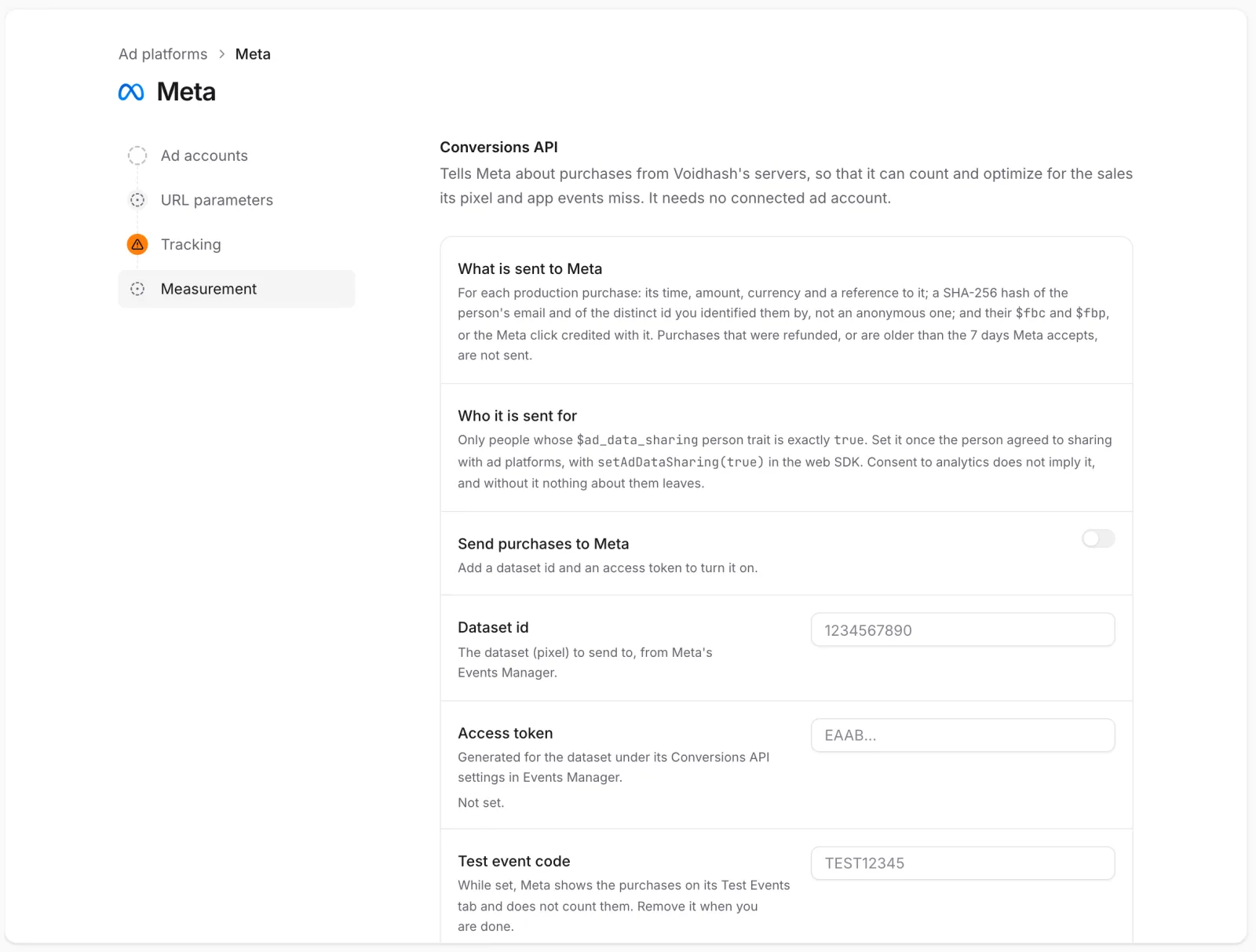 Dataset id and Access token go on the Measurement tab
Test with a test event code
Copy the code from the Test events tab in Events Manager into Test event code. Meta lists what arrives under that tab and doesn't count it. Make a real production purchase, wait about 20 minutes until it shows in Events Manager, then remove the code. Purchases sent as tests aren't sent again.
Changing these settings needs an admin or the owner.
When purchases arrive
A purchase usually reaches Meta within 20 minutes. Voidhash sends every 15 minutes, after giving each purchase a few minutes to settle.
- Turning it on sends purchases made from then on, not earlier ones.
- Turning it off and on again drops what hadn't been sent yet.
- Purchases waiting for a price wait up to an hour for the store to confirm the price, then are skipped. Many skips mean the store's notifications don't reach Voidhash; ask an admin to check the store's notifications in Payment providers.
When it fails
Measurement shows when Meta last took purchases and the last error, and warns when sending hasn't run for over an hour. Voidhash keeps retrying every 15 minutes and resumes where it stopped once you fix the cause, for example with a new token. Meta doesn't accept purchases older than 7 days, so anything that waited longer is skipped.
When Meta refuses a purchase as invalid, Voidhash skips it and shows Meta's reason. After 10 refusals in a row, Voidhash pauses sending until you fix the setup, so the remaining purchases aren't skipped. While a test event code is set, any refusal pauses sending.
Install referrer key
Android installs from Meta ads carry a coded note naming the ad. To read it, copy the Install Referrer Decryption Key from your app's settings in Meta for Developers and enter it as the Decryption key under Install referrer on the Measurement tab. Without it, installs from Meta ads count without their ad. Measurement warns if the key later fails to work.
If something's off
- Nothing reaches Meta: check Send purchases to Meta is on and the token is valid; the Measurement tab shows the last error.
- Meta counts purchases twice: your website or app also sends them; send them one way only.
- Measurement says purchases could not be sent: it lists why, such as people who didn't agree to sharing or whom Meta can't recognize. See What Meta receives.
- Delivery says purchases were skipped: they waited past Meta's 7 days, Meta refused them, or they had no price after an hour. See When it fails.
Next steps
Still stuck? Check Troubleshooting, ask us on Discord, or email support@voidhash.com on a paid plan.
Something wrong or missing on this page? Tell us by email or on Discord.