Translate a paywall
Add languages to a paywall in Translate mode, and know which language each person sees.
Translate mode lists every piece of a paywall that can differ by language, next to its default-language version. Each paywall has its own languages, called locales, and each device sees the closest match to its language.
Paywalls are in early access. Ask us on Discord, or email support@voidhash.com on a paid plan, to turn them on for your team.
Add a language
- In the designer, click Translate in the left rail, or choose File → Translations in the main menu.
- In the Locales list, click + (Add locale).
- Type a language tag, such as
deorpt-BR, or pick a suggestion.
The default locale is en, marked Default. What you design in Design mode is the default
content. Each other locale shows a bar with how much is translated.
Translate content
The table has one row per item: the Element, the default version and the selected locale's version. Rows are grouped by screen and tagged Text, Image or Prop.
- Text: type the translation and press Enter. The default text shows until you translate it.
- Image: Add localized image stores another image for this locale. Builds don't include localized images yet: every locale shows the default image, and the build warns about it.
- Prop: translate the text settings of a custom component.
Narrow the table with the search box, the screen filter, the kind filter (All kinds, Texts, Images, Component props) and the Untranslated checkbox. The Preview pane shows the selected row's screen in that language.
You can also edit a locale on the canvas: pick it in the language switcher in the rail, and text edits go to that locale.
Keep placeholders such as {plan.price} in every translation, moved to wherever the language needs
them.
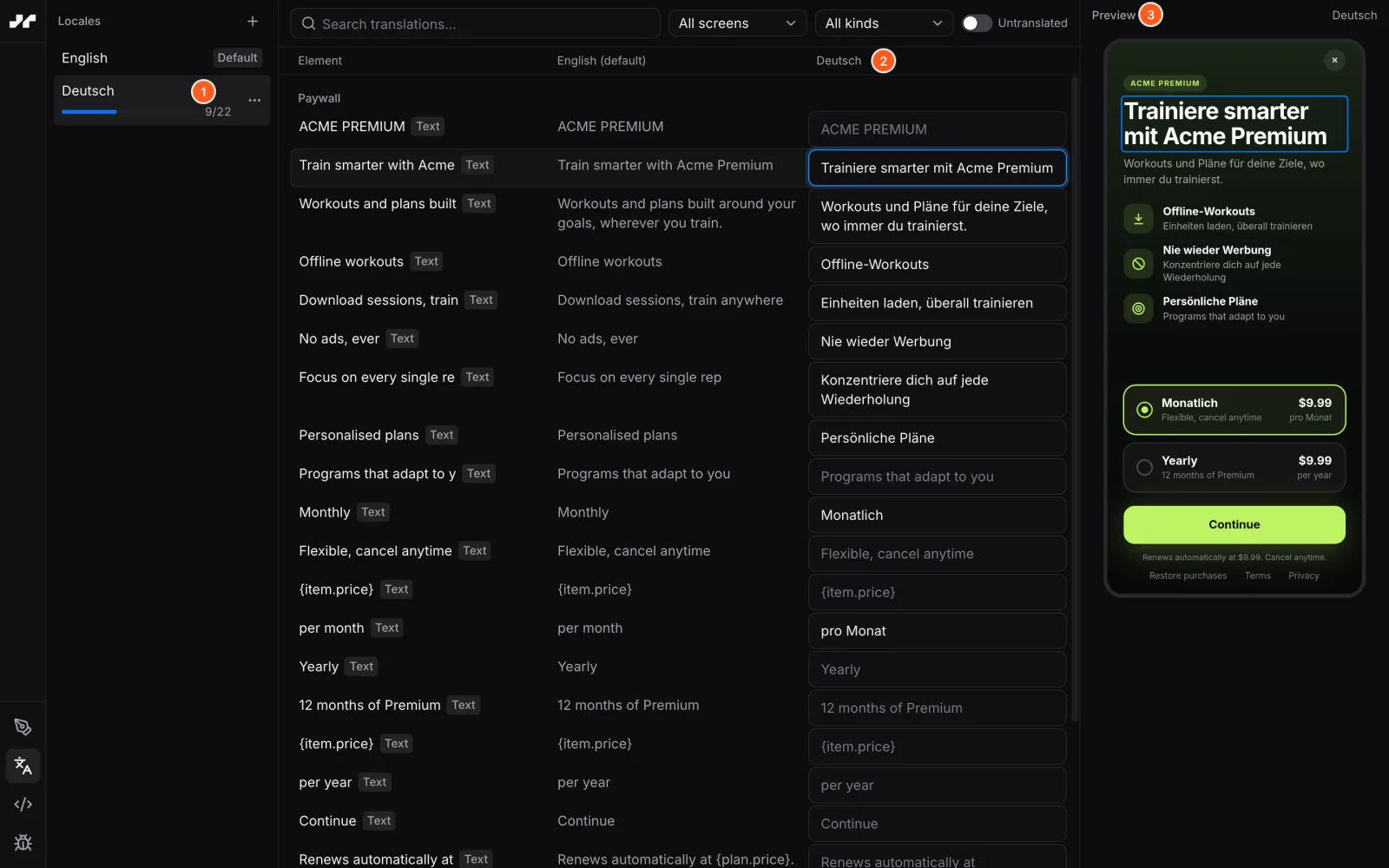 Each added language gets a column of strings to translate
Manage locales
Each locale's menu has:
| Item | What it does |
|---|---|
| Set as default… | Makes this locale the default. The base content is relabeled; no text or image changes. |
| Copy translations from | Copies another locale's translations, for example pt into pt-BR. Shown with 2+ extra locales. |
| Clear translations… | Deletes the locale's translations and keeps the locale. |
| Remove locale… | Deletes the locale with all its texts, images and component props. |
Undo (⌘Z) reverses clearing and removing. Translations reach apps when you build and deploy the paywall.
Which language a person sees
The paywall follows the first language in the person's device or app settings, and picks content for each text separately:
- A translation for the exact tag, such as
pt-BR. - Otherwise, one for the language alone, such as
ptfor apt-BRdevice. - Otherwise, the default content.
A device set to pt doesn't use a pt-BR translation, so add the plain language too when you
translate for a region. Only the first preferred language counts. If the person changes language
while the paywall is open, it switches.
Prices always come from the store in the person's own currency and format, whatever the paywall's
language. Don't translate prices; use {plan.price} in every locale.
If something's off
- A device shows English: its first language has no translation, or only a regional one, such
as
pt-BRfor aptdevice. - A localized image doesn't appear: builds don't include localized images yet.
- Translations don't show in the app: build and deploy the paywall after translating.
Next steps
Still stuck? Check Troubleshooting, ask us on Discord, or email support@voidhash.com on a paid plan.
Something wrong or missing on this page? Tell us by email or on Discord.