Metric definitions
How Voidhash calculates MRR, churn, lifetime value, trial conversion and every other metric in Studio.
Every metric in Studio comes from the same definitions, wherever you read it. The five asked about most:
- MRR: what active subscriptions bring in per month, after tax and before store commission.
- Revenue: everything charged, including tax and store commission, minus refunds.
- Proceeds: what you keep after tax and commission.
- Churn rate: subscriptions that ended in a period, free trials included, against paid subscriptions active at its start.
- Trial conversion rate: trials that turned paid, against trials started in the same period.
Every other metric is in a collapsed list under its section. To compare a number with your store, see Check a number against App Store Connect.
Unless a metric says otherwise:
- Money is shown in your team's reporting currency.
- Purchases count from the environment selected in Studio, production by default. See Environments.
- Days, weeks and months start at midnight in your time zone, and weeks start on Monday.
- A period is one bucket of the chart: an hour, day, week, month, quarter or year.
Recurring revenue
MRR is the monthly value of the subscriptions people pay for right now. Voidhash recalculates a subscription's MRR on every store event and records the change as an MRR movement, so MRR at any moment is the sum of all movements before it.
| Metric | Definition |
|---|---|
| MRR | The sum of every paying subscription's price per month, at the end of the period. |
Revenue
| Metric | Definition |
|---|---|
| Revenue | Purchases and renewals minus refunds and revoked purchases, by the time each happened. It includes tax and the store's commission. |
| Proceeds | What you keep: revenue after tax and the store's commission. The Gross to net chart splits revenue into proceeds, commission, tax and refunds. |
Subscriptions and trials
Trial conversion rate is converted trials ÷ trials started, both in the same period. It compares conversions and trial starts of the same period, which are mostly different people. With a 7-day trial and weekly periods, this week's conversions come from last week's trials, so the rate can pass 100% when trials grow. The Trial conversion by segment chart on the Trials page divides by trials that ended in the period instead.
Churn and retention
| Metric | Definition |
|---|---|
| Churn rate | Subscriptions that ended in the period, free trials included, ÷ paid subscriptions active at its start. It counts subscriptions, not revenue. |
Lifetime value and ad costs
Voidhash has two lifetime values. They answer different questions and don't match.
Audience
How many people use your product, and how often.
Headline numbers
A metric card shows one number for the whole range:
- At the end of the range: MRR, ARR, active subscriptions, active trials.
- Change across the range: MRR growth rate.
- Average of the periods: churn rate, retention, active subscribers growth, trial conversion rate.
- Sum of the periods: everything else.
The change under the number compares the range with the one of the same length right before it.
Check a number against App Store Connect
- In the project switcher, choose Production. Open Analytics → Revenue, and set the range to 3m and the granularity to Monthly.
- If the Store filter shows, set it to the App Store.
- Under What you keep, point at last month's bar in Gross to net and note Proceeds.
- In App Store Connect, open Sales and Trends, choose Proceeds, and set the same month.
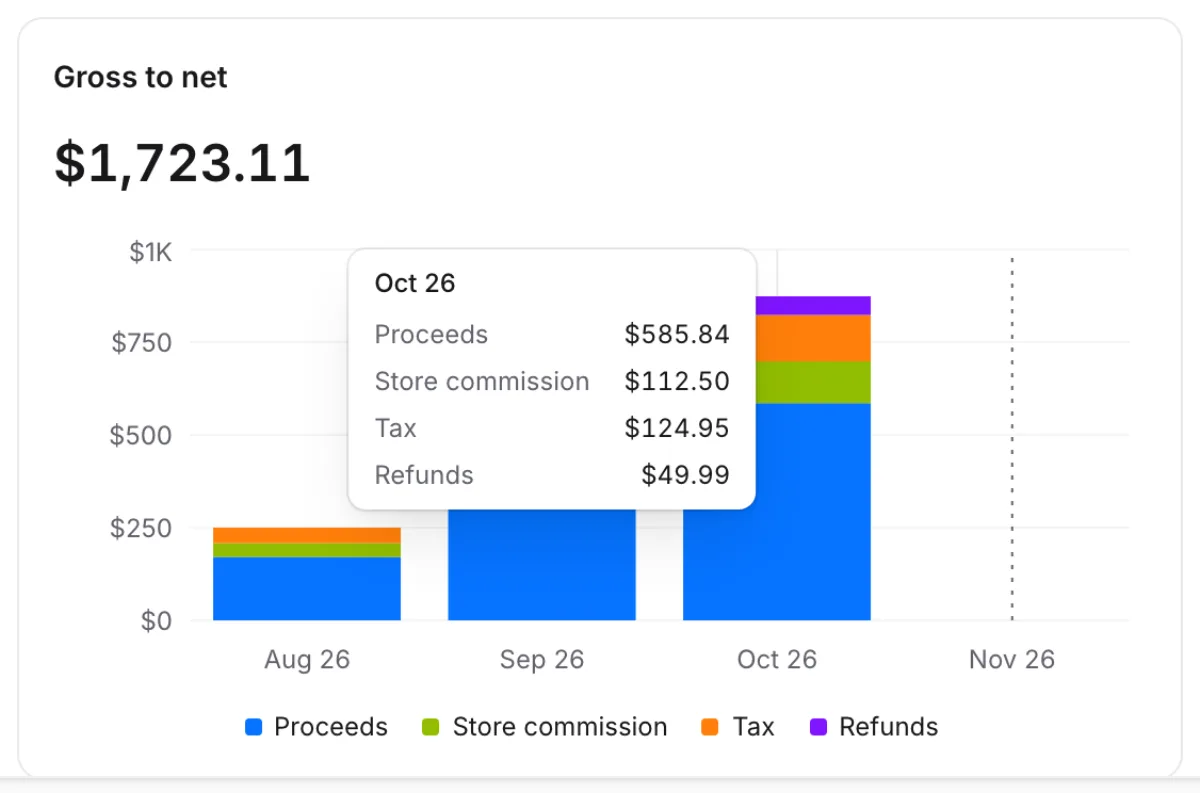 Point at a month to see where its revenue went
The two proceeds figures should be close. Compare proceeds, not revenue: Studio's Revenue includes tax and Apple's commission. A gap of a few percent comes from exchange rates (Studio converts each day at that day's rate), day boundaries (your time zone against Apple's) and refunds (Studio counts them on the day of the refund).
If something's off
- A number is much lower than the store's: check the environment and filters, then Analytics → Data health. See Numbers look wrong.
- Trial conversion rate is over 100%: that's expected when trials grow; see Subscriptions and trials.
- CAC, LTV : CAC or payback is empty: no ad account is connected.
- MRR and active subscriptions disagree: subscriptions in billing trouble count differently; see Subscriptions and trials.
Next steps
Still stuck? Check Troubleshooting, ask us on Discord, or email support@voidhash.com on a paid plan.
Something wrong or missing on this page? Tell us by email or on Discord.