Audit log
See who changed what in a project, and when.
The audit log records every change to a project's setup: who made it, what changed, and when. Each project has its own log, and only admins and the owner can read it.
See an item's history in Studio
Studio shows the history of single items:
- Feature flags: the change history at the bottom of a flag's page lists changes to the flag's slug, name, description, status and rollout, and its creation, archiving and restoring. See Feature flags.
- A/B tests: the change history at the bottom of a test's Overview tab.
The list has no heading of its own and shows 50 entries at a time, with Previous and Next.
Each entry shows what happened, such as updated, the ID of the person who made the change, or
System, and when. Changes opens what changed. Every flag and test starts with a created entry.
Changes shows settings as developers name them. after lists the fields that changed, with the
item's id, and before holds the item's full settings before the change. The fields a flag change
most often touches:
enabled: whether the flag is on (true) or off (false).rolloutBps: the rollout in hundredths of a percent, so2500is 25% and10000is everyone.key,nameanddescription: the flag's slug, name and description.
Changes to a flag's variants, allow and deny lists and overrides are recorded too, as entries of
their own such as target_added or override_set, but they're only in the
full log, not in the flag's history.
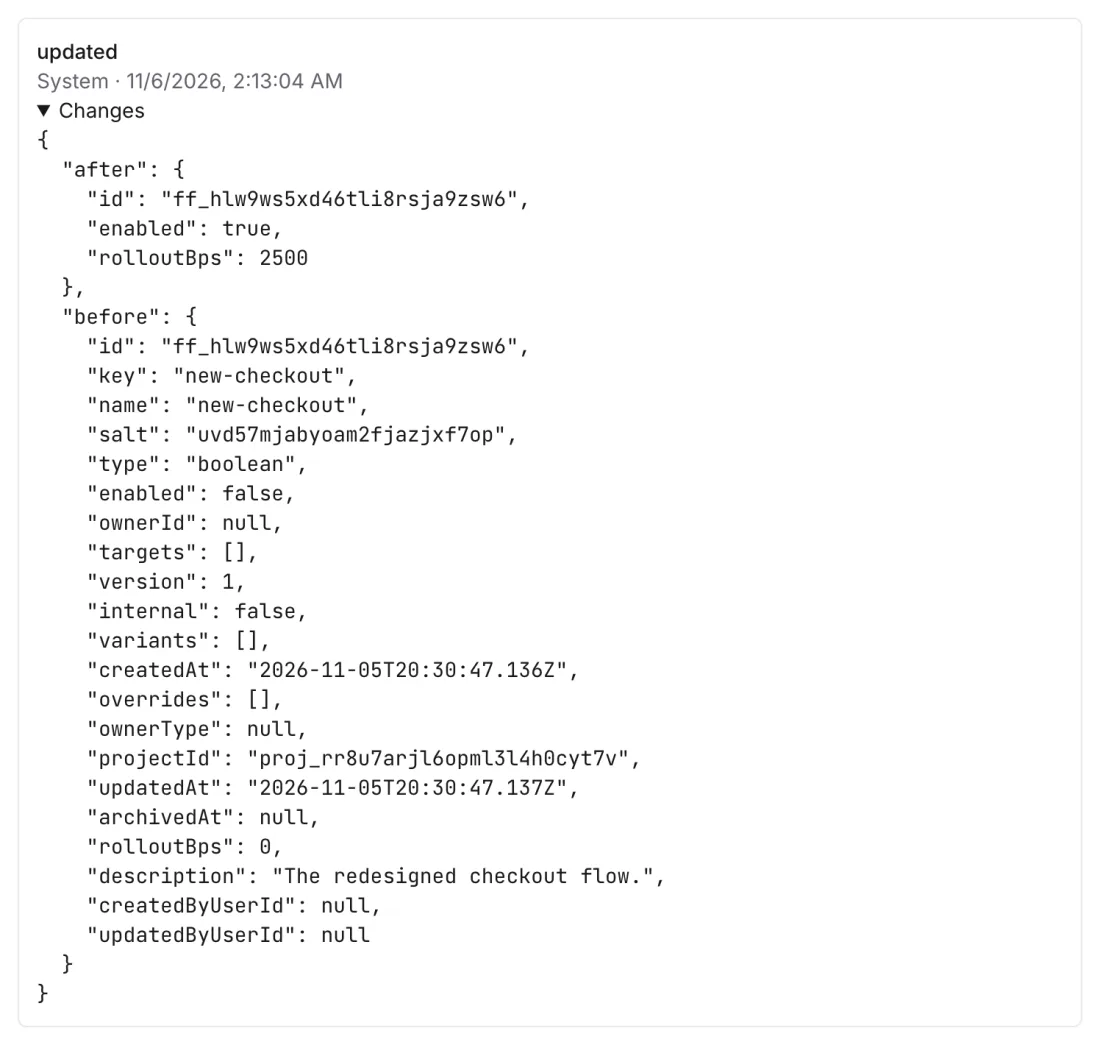 after lists what changed; before shows the full settings it replaced
Read the full log
Studio has no page for the whole log. To answer questions such as "Who turned off the onboarding flag yesterday?", ask Void or another AI agent connected through the MCP server, or ask a developer to read it from the CLI or the API (developer docs).
What is recorded
| Area | Items |
|---|---|
| Project | The project, API keys, deleted person data, personal folders |
| Catalog | Products, perks, the perks a product unlocks |
| Feature flags | Flags, variants, overrides, allow and deny lists |
| A/B tests | Tests and their variants |
| Paywalls | Paywalls, components, locations, builds and deploys |
| Payment providers | Store and payment connections, store products |
| Messaging | Push settings, registered devices, webhooks, automations |
| Ads and tracking | Ad accounts, tracking domains |
| Analytics | Insights, cohorts, dashboards, alerts |
Team changes, such as members, roles and invitations, aren't in a project's audit log.
If something's off
- You can't see an item's history, or it says "Could not load activity.": only admins and the owner can read the audit log; see Roles.
- A team change is missing: members, roles and invitations aren't in a project's log.
- A flag's override or list change is missing from its history: those are only in the full log.
Next steps
Still stuck? Check Troubleshooting, ask us on Discord, or email support@voidhash.com on a paid plan.
Something wrong or missing on this page? Tell us by email or on Discord.