Check your data
Confirm that events, purchases and webhooks reach Voidhash complete and on time.
Two Studio pages tell you whether your data can be trusted. Activity → Analytics events shows single events as they arrive, which helps while an app is being set up or tested. Analytics → Data health shows whether data keeps arriving complete and on time once the app is live.
Watch events arrive
Activity → Analytics events lists the latest events of the selected environment, newest first, 100 at a time, up to the latest 500, with Event name, Event ID, Person and Received. Select an event name to see its details:
- Event time, Received at and Processed at.
- The Person, their Distinct ID, and for a sign-in, the Previous distinct ID they had before.
- Properties and Context: the details your app and device added.
Show more loads the next 100. Past the latest 500 it stays on the page but shows nothing older.
The page doesn't update while you watch; it refreshes when you come back to the tab, or reload it.
To check a new app version end to end:
- Open the app or website, on a build that matches the environment you're viewing.
- Do something that records an event, such as opening a screen.
- Find the event in Analytics events, select it, and check its person and properties.
- Sign in to the app and check that later events show the same Person.
The Data health page
Analytics → Data health follows the page's range and filters.
- Events by name: events stored per period, for your 8 busiest events. A sudden drop usually means a release broke tracking.
- Rejected events: events that reached Voidhash but couldn't be stored, by reason. Look into anything above zero; see Rejected events.
- Event delay: time from an event happening to reaching Voidhash. A long tail is normal for apps used offline.
- Coverage of payers: paying people the app never recorded any event for, and their share. They declined analytics, or the app signs them in with a different ID than their purchases use.
- Webhook success: the share of delivery attempts your own servers accepted, retries included. Anything below 100% is worth telling your developers.
- Webhook response time: how fast your servers answer. Slow answers risk failed deliveries.
- Store notification delay: time from a store or Stripe reporting a purchase to Voidhash processing it. Long delays mean purchases show up late. An empty chart can mean store notifications aren't set up.
Coverage of payers covers all time in production, not the selected range. The webhook and store notification charts show the same data in every environment.
Rejected events
The Rejected events chart groups events by reason:
| Reason | Meaning |
|---|---|
schema_rejected | The event was malformed, for example without a person ID. |
reserved_event_name | The app sent a name only Voidhash may record, such as a purchase event. |
policy_rejected | Settings → Events blocks the event, or event collection is off for the project. |
processing_failed | Voidhash couldn't process the event. Contact support; these can be recovered. |
| Other reasons | Voidhash couldn't read what the app sent. Ask your developers. |
Events from people who declined analytics, and from bots, are dropped before they're counted, so they never appear here.
Settings → Events chooses which built-in events the project stores, and can block an event by name. Turning off an event you rely on empties the reports that use it. Changing it needs an admin or the owner.
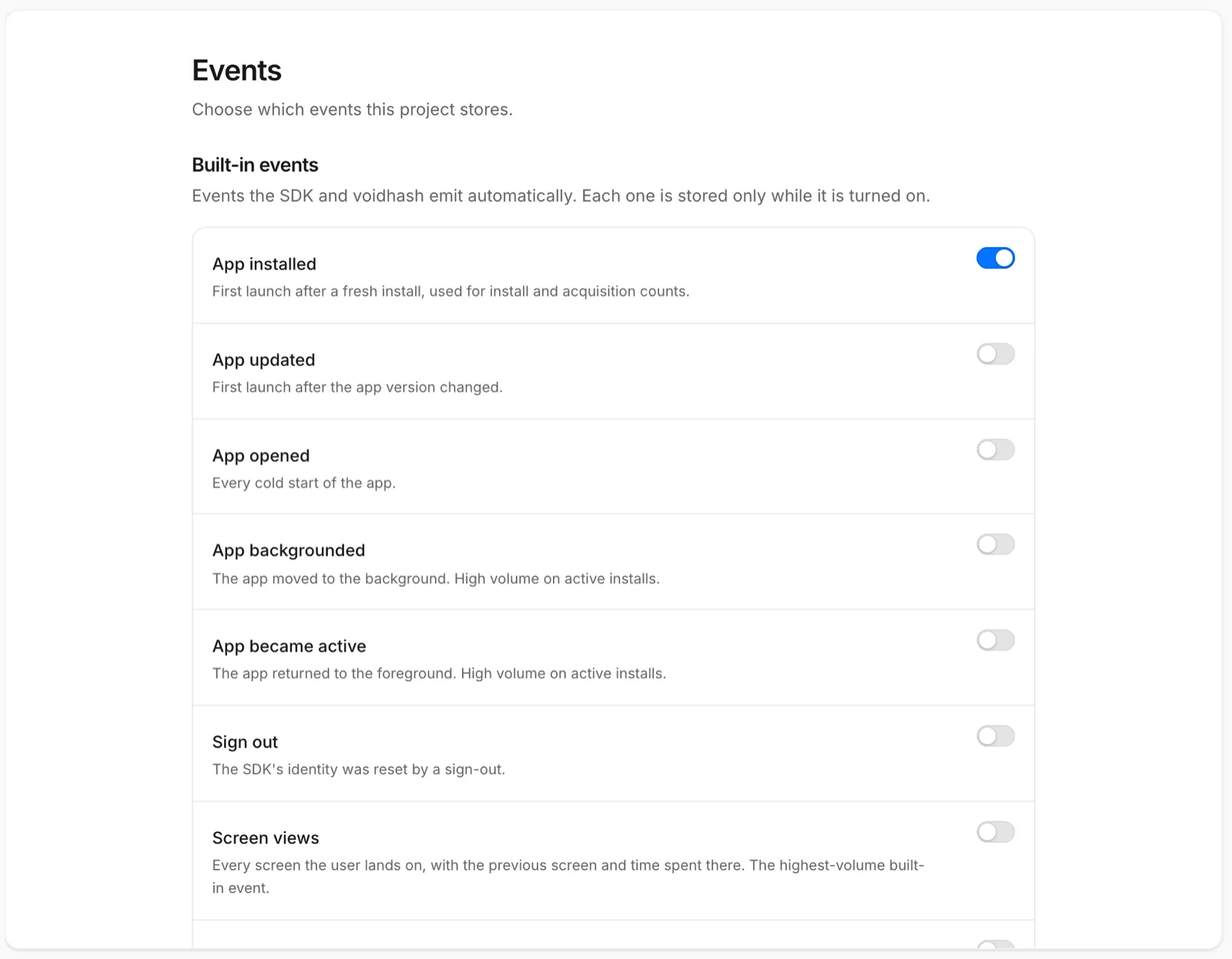 Turn off a built-in event to stop keeping it
If something's off
- No events at all: you're viewing another environment, or the app uses the wrong key. Check the environment in the project switcher, then ask your developers.
- Events but no revenue: the store isn't connected, or its notifications don't reach Voidhash. Ask an admin to check Settings → Payment providers; see Payment providers.
- Payers without events: people declined analytics, or the app signs people in inconsistently. Ask your developers to identify people (developer docs) the same way.
- An event's count dropped after a release: the new version stopped sending it. Compare Events by name with the release marker, and add an alert.
reserved_event_namerejections: the app sends its own purchase events. Ask your developers to remove them; Voidhash records purchases itself.
For developers: follow events live from the CLI, and see the developer troubleshooting guide.
Next steps
- Set up alerts
- Troubleshoot numbers that look wrong
- Events (developer docs)
Still stuck? Check Troubleshooting, ask us on Discord, or email support@voidhash.com on a paid plan.
Something wrong or missing on this page? Tell us by email or on Discord.