Ads reports
Compare what your ad platform reports with the signups, payers and revenue Voidhash measured.
The Ads pages set your ad spend against the people each campaign, ad set and ad brought in and what they paid. They need a connected Meta ad account.
Find which campaign pays back
- Open Ads → Cohorts and click the ROAS tab.
- Set the Date chip to Last 13 weeks (the default) or Last 90 days, so most groups have had time to pay.
- Next to Cumulative ROAS, click Campaign.
- Read the Payback day table: Payback shows the day each campaign's revenue passed its spend, or Not yet.
A campaign with an early payback day earns back its spend fastest. For one that says Not yet, ROAS by day 365 and Payback chance (when shown) say whether it's likely to pay back within a year. Credit follows the rules in Ad measurement.
Reported, measured and estimated
Every report keeps three kinds of numbers apart and never adds one to another:
| Kind | Source | Examples |
|---|---|---|
| Reported | Meta, with its own attribution | Spend, impressions, link clicks, results, Meta's purchase value and ROAS |
| Measured | Voidhash, from the people credited to the ad | Visits, installs, signups, trials, payers, net revenue, cost per payer, True ROAS |
| Estimated | Voidhash's estimate of what it couldn't see | Estimated revenue, Estimated ROAS |
ROAS, return on ad spend, is revenue ÷ spend: 150% means each dollar of spend brought back $1.50. True ROAS is measured net revenue ÷ spend. Each person's revenue counts once, on the ad credited with their signup. Meta's ROAS can count one purchase for several ads, so the two often differ.
Estimated revenue is an upper estimate. A visitor who declines analytics consent or leaves before the page loads sends no visit, so measured revenue is a floor. The estimate assumes web clicks without a visit converted like those with one. It needs at least 30 measured visits, isn't made for app store ads, and never exceeds the revenue of unattributed people in the range.
Controls
Every Ads page has a Date chip: Today, Yesterday, Last 7 days (the default), Last 14 days, Last 30 days, Last 90 days or Last 13 weeks, except Cohorts, which offers Last 30 days, Last 90 days and Last 13 weeks (the default). Periods are compared with the period before unless you choose No comparison. The header shows when the accounts last synced, and warns when a sync failed or is overdue.
Money is in your reporting currency, or, until you choose one, the ad accounts' currency (US dollars when they differ). Days follow the accounts' time zone, or UTC when they differ. Revenue counts production purchases.
Numbers for the latest days can still rise: today's spend is still accruing, and new signups keep converting to payers.
Overview
Ads → Overview answers whether your ads pay off.
- Key conversion (Signup, Trial when your project has trials, or Payer) and the attribution window (1, 7, 14, 30, 60 or 90 days) set how ads are judged. They apply to every Ads report in the project. Changing them needs an admin or the owner; Members see them grayed out.
- Tiles: Spend, Net revenue, True ROAS (with Meta's ROAS and ROAS in the first 7 days), cost per key conversion, Signups and your key conversion.
- Needs attention: rejected ads, spending limits almost reached, ad sets marked Learning limited (too few results for Meta to finish optimizing them), ads that don't deliver, failed syncs, account issues, spend without tracking parameters, and creative fatigue (people have seen an ad so often that fewer click it).
- Funnel by surface: link clicks, visits, installs, signups, trials and payers, with conversion and cost per step. Steps your project doesn't have, such as installs for a web-only product, are left out.
- Converted on: payers and net revenue by the surface they paid on.
- By platform: Meta's reported numbers beside Voidhash's measured ones, plus rows for organic, unattributed and other revenue.
- Top movers and Top creatives by true ROAS or spend.
- Attribution coverage: the share of revenue traced to a credited touch, why the rest isn't (No touch, Outside the window, No person), and the estimate.
- What people say brought them: answers to your "How did you hear about us?" question.
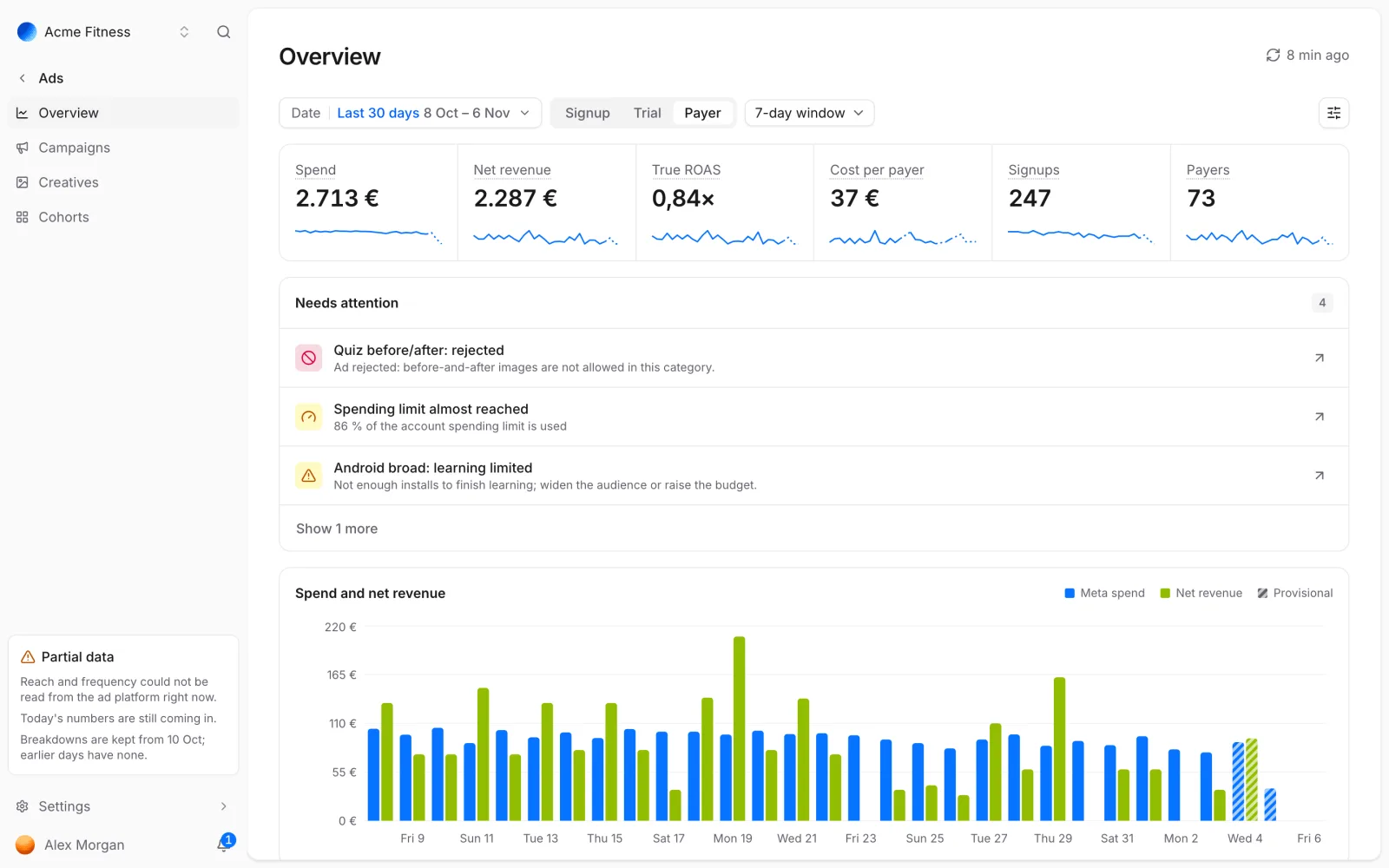 Start with what needs attention, then spend against revenue
Campaigns
Ads → Campaigns lists performance at the Campaigns, Ad sets or Ads level. Filter by Status and Destination, search by name, and sort by any column. Columns presets choose what to show: Performance, Delivery, Funnel or Attribution, which adds the estimate and returning revenue. A Breakdown splits rows by Placement, Surface, Country, Age, Gender or Device; placement, country, age, gender and device cover the last 28 days. Download the current page as CSV.
Select a campaign, ad set or ad for its details: pacing against budget, payback, and for an ad its preview, tracking parameters, daily trend and, for a video, its hook and hold rates: how many viewers stay past 3 seconds, and how many of those keep watching.
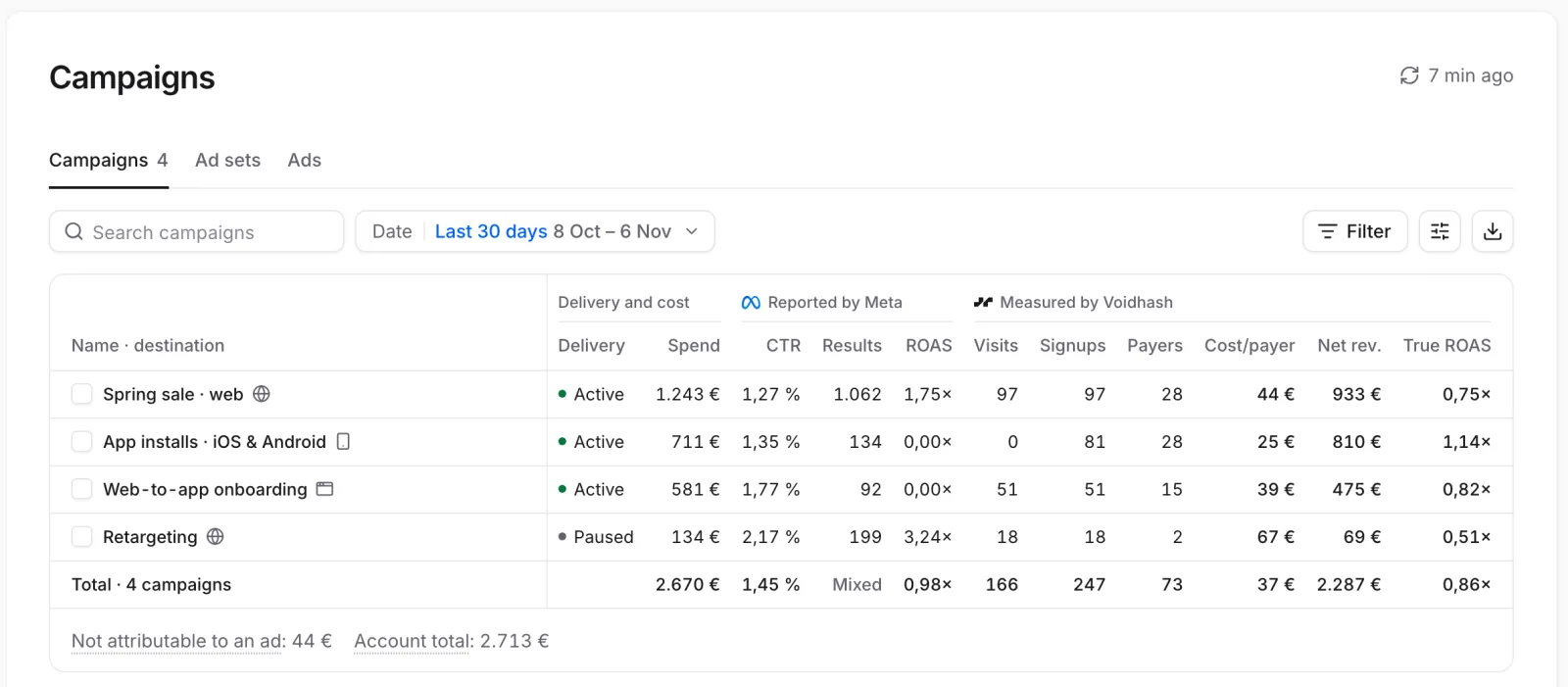 Meta's numbers sit next to the ones Voidhash measures
Creatives
Ads → Creatives ranks creatives by spend, with status, Link CTR, frequency, cost per payer and True ROAS. Filter by Format: video, image or carousel.
Cohorts
Ads → Cohorts shows when ad spend pays back, by the week or month people were acquired. Choose ROAS, Revenue per payer or Payers, and group by Surface, Platform, Campaign or Ad set.
- Cumulative charts show each group's metric by days since acquisition.
- Payback day lists the day each group paid back its spend and, when projections are shown, its ROAS by day 365 and the chance it pays back.
- Weekly cohorts is a heatmap of each cohort at day 0, 1, 3, 7, 14, 30, 60, 90, 180, 365 and 730. Choose Month in its menu for monthly cohorts.
Dashed lines and ≈ values are projected. Ranges cover 8 of 10 likely outcomes. A hatched cell is Still maturing: some of its people haven't reached that day.
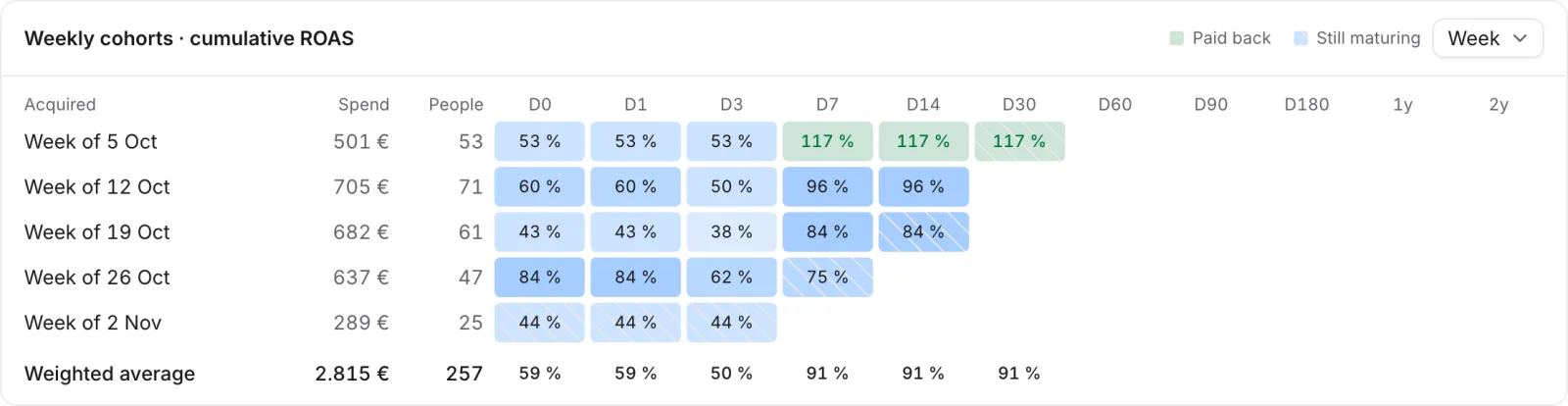 Each row is a week's cohort; read across to see payback
If something's off
- Overview says "No ad platforms connected yet": connect a Meta ad account.
- Numbers are empty just after connecting: the first sync is still running; the header reads Syncing.
- Meta and Voidhash disagree: that's expected. Meta can credit one purchase to several ads; Voidhash credits each person once. See Reported, measured and estimated.
- Today's numbers look low: spend is still accruing and new signups keep converting.
For developers: AI agents and scripts can pull the same reports, and a log of campaign changes, from the CLI, the API and the MCP server (developer docs).
Next steps
Still stuck? Check Troubleshooting, ask us on Discord, or email support@voidhash.com on a paid plan.
Something wrong or missing on this page? Tell us by email or on Discord.