Automations
Send push notifications, update people and call webhooks automatically when something happens.
An automation takes each person through steps you design, starting when something happens: they buy, sign up, go quiet, or a scheduled campaign begins. Use one to welcome new people, remind someone their trial ends soon, win back a canceled subscriber or tag a person.
Automations are in early access. Ask us on Discord, or email support@voidhash.com on a paid plan, to turn them on for your team.
Build a flow
Open Automations, click New automation, enter a Name and click Create. The builder opens. Then:
- Choose a trigger, from the table below.
- Click + on a connection to add a step, and repeat.
- Select a step and fill it in on the panel at the right.
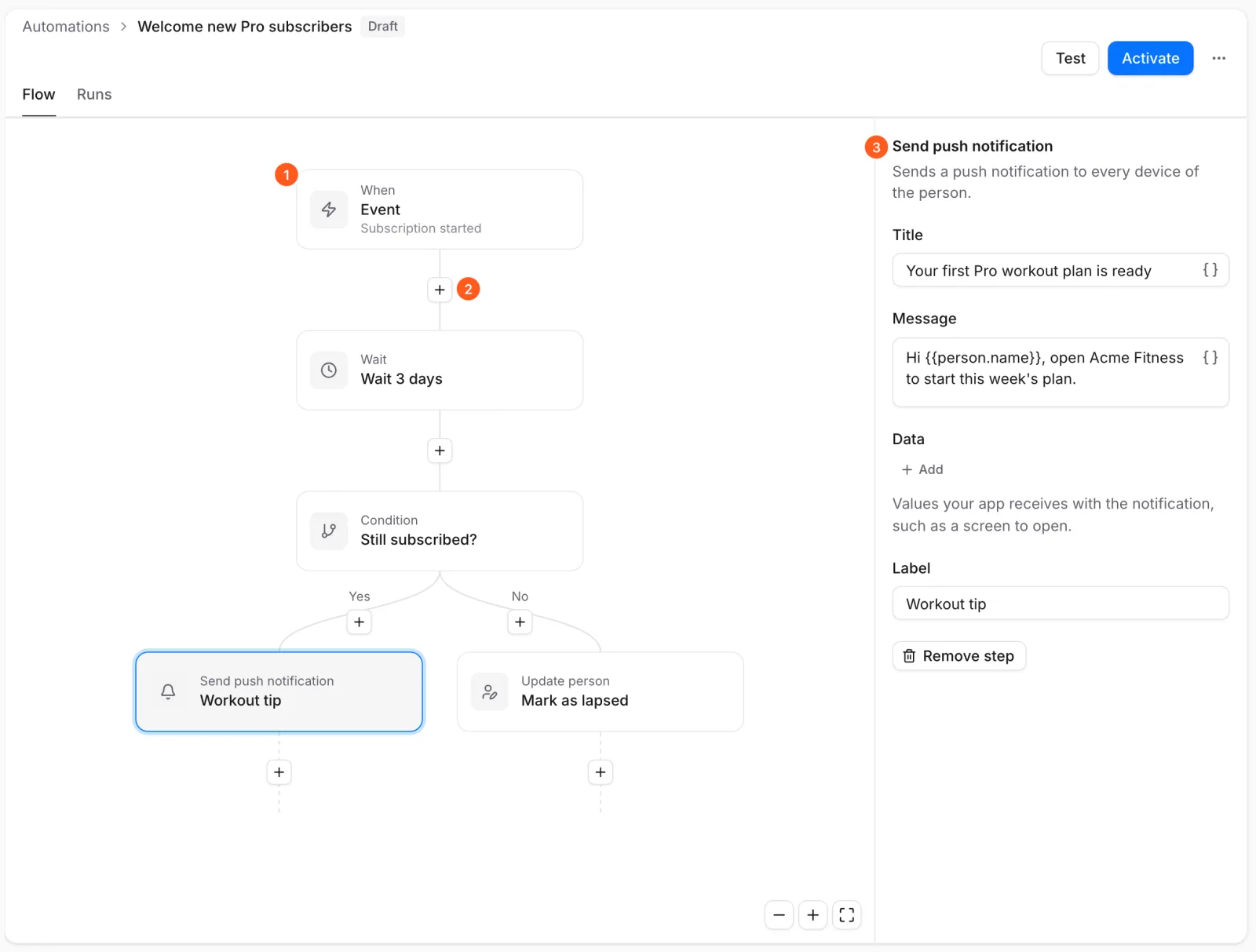 (1) the trigger · (2) + adds a step · (3) the selected step's settings
The flow saves as you edit and reaches nobody until you activate it.
| Trigger | Starts when |
|---|---|
| Event | A person does something your app records, or makes a purchase. Only if narrows it. |
| Person signs up | A person signs in for the first time, within about a minute. |
| Schedule | At a set time, or repeatedly, at most once an hour, in a time zone you choose. |
| Started by hand | A developer, through the API, or an AI agent adds a person to it. |
A Schedule enrolls an Audience: Everyone, or a cohort saved on the Insights page (Voidhash Cloud), optionally narrowed by rules. When you activate it, Studio shows how many people its next run would reach.
| Step | What it does |
|---|---|
| Send push notification | Sends a push to the person's devices. Title up to 200 characters, message up to 1,000. |
| Update person | Sets details on the person. Keep existing values only fills in missing ones. |
| Send webhook | Notifies your own server, for example to send an email from your system. |
| Start automation | Takes the person into another active automation. |
| Set variable | Keeps a value for the rest of this run. |
| Wait | Waits a fixed time, up to 366 days. |
| Wait until time of day | Waits until a time, such as 09:00, optionally in the person's own time zone. |
| Wait for event | Waits until the person does something, or gives up after a time you set. |
| Condition | Takes one path if your rules hold and another if they don't. |
| Split | Sends set shares of people down different paths. |
| Feature flag | Takes a path by what a feature flag says for the person. |
| A/B test | Sends people down the variants of an A/B test and measures them. |
A flow can have up to 100 steps and 50 variables. Push notifications need a push service connected first, and webhooks need a developer; see Webhook delivery (developer docs).
Personalize messages
Optional: a message can include details about the person, such as their name. Click the braces
button () beside any message or value and pick what to insert. Studio writes it as
{{ person.name }}. To show something when the value is missing, add a default yourself:
{{ person.name | default: "there" }}. Values are read when the step runs, so they're always current. What you can insert, by
its name in the list:
| Pick | Written as | What it is |
|---|---|---|
| Name, Email | person.name, person.email | Who they are. |
| Person trait | person.traits.<key> | A detail saved on the person, such as a survey answer. |
| Entitlements | person.entitlements | The perks they have now. Use contains to ask about one. |
| Signed up at, Last seen | person.signedUpAt, person.lastSeenAt | When they signed up and were last active. |
| Signed up on | person.surface | Where they signed up: ios, android or web. |
| Subscription status | person.subscription.status | active, trial, billing_issue or expired. |
| Subscription product name, Subscription renews, Subscription ends | person.subscription.productName, .willRenew, .expiresAt | Their product's name, whether it renews and when it ends or renews. |
| Can receive push | person.canReceivePush | Whether one of their devices can get a push. |
| Event property | event.properties.<key> | A detail of the event that started the run. |
| Variable | vars.<name> | A variable of this flow. |
| Feature flag is on, Feature flag variant | flags.<key>.isEnabled, .variant | Whether a flag is on for them, and which variant they get. |
Date rules can ask was more than … days ago and is within … days: someone not seen in a week, or a subscription that ends in the next three days.
Variables last for one run. To keep a value for later, save it on the person with Update person.
A/B test a flow
- Add an A/B test step, then choose a test or New A/B test. Each variant becomes a path.
- Build each path. Leave the control empty to compare sending something with sending nothing.
- Open the test, set its goal event, and start it.
Until the test runs, everyone takes the control and nobody is counted. Once you conclude it, everyone takes the winner. Results need the Experiment exposure event turned on in Settings → Events, which is off by default in self-hosted Studio; activating warns you if it's off.
Purchase events
An Event trigger or Wait for event step can use these purchase events, which Voidhash records itself. Pick them by name in Studio:
| Shown in Studio as | Happens when |
|---|---|
| Subscription started | A person started a subscription or a trial. |
| Subscription renewed | A subscription renewed and was paid. |
| Subscription cancelled | A person turned off renewal. They keep access until the period ends. |
| Subscription expired | A subscription ended, and access with it. |
| Payment failed | A renewal payment failed and the store is retrying. |
| Renewal turned back on | A person who canceled turned renewal back on. |
| Plan changed | A person moved to another product. |
| Offer redeemed | A person redeemed a store offer. |
| Purchase completed | A one-time purchase went through. |
| Purchase refunded | A purchase was refunded. |
Imported purchase history starts nothing, and neither does an event more than 24 hours old. Automations made in Studio react to production data only.
Avoid messaging the wrong people
Select no step to see the flow's settings:
- Who can enter again: once per person (the default), every time, or again after a wait.
- Leave the flow on: events that take a person out. Add one to anything that nudges, so nobody is asked to buy what they bought yesterday.
These rules apply to one automation at a time, so two campaigns can still reach the same person on the same day.
To try a flow, click Test and pick a person by name, email or ID. Their path lights up and each message shows as they would read it. Nothing is sent and waits are skipped. Choose an answer for each flag, A/B test and awaited event to try paths this person wouldn't take.
Activate and change a flow
Click Activate. Studio lists anything that blocks the flow, such as push notifications not being set up. Members can open flows and read their runs; creating, changing and activating them takes an admin or the owner. Members still see New automation, Retry and Cancel run, which end in an error.
| Status | Meaning |
|---|---|
| Draft | Not activated yet, or unarchived. Nothing runs. |
| Active | People enter and move through it. |
| Paused | Nobody enters. People already in it stay where they are until you Resume. |
| Archived | Ended. Every run still going is canceled; history stays readable. |
Edits to an active flow wait until you click Publish changes, which makes a new version. People already in the flow finish the version they started.
Choose Pause or Archive from the flow's menu. Unarchive, in the same menu, brings an archived flow back as a Draft.
The Runs tab shows each person's run and its current step. Open a run to Retry a failed step or Cancel run.
| Run status | Meaning |
|---|---|
| Queued | About to start. |
| Running | Working through steps. |
| Waiting | On a wait step. |
| Paused | Held while the automation is paused. |
| Completed | Reached the end. |
| Left early | Left through a Leave the flow on event. |
| Cancelled | Taken out by hand or by archiving. |
| Failed | A step failed. Retry continues from it. |
AI agents and bots can also draft, test and activate automations.
If something's off
- Nobody enters: the flow isn't Active, or Who can enter again keeps people out.
- A push step fails: push notifications aren't set up, or the person has no device that can receive them. See Push notifications.
- A/B test shows nobody: the Experiment exposure event is off in Settings → Events, or the test isn't running.
Next steps
Still stuck? Check Troubleshooting, ask us on Discord, or email support@voidhash.com on a paid plan.
Something wrong or missing on this page? Tell us by email or on Discord.